If you want to change main root FTP Account then you need to change the password of your cPanel Account. However, if you want to change the password of a specific FTP Account, you should follow this instruction.
1. Log into your cPanel account.
2. In the "Files" section, click on "FTP Accounts" Icon.

![]()
3. Under the "FTP Accounts" list, click on "Change Password" or use the "Password Generator". 
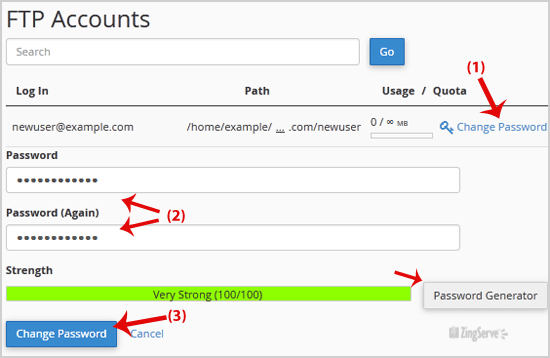
4. Click on the "Change Password" button.
Now you can access your FTP user account with your new password.

Categories
Backup/Restore
4
Billing & Accounts
7
cPanel - Control Panel
77
Databases
22
DNS - Nameserver
6
Domain Management
14
Email
100
FTP Questions
42
Installing a Control Panel
6
Others
3
Pre-sales Questions
9
Scripts & Applications
106
Security
18
SiteWorx (Control Panel)
60
SolusVM
19
SSL
5
Troubleshooting
4
Categories
Tag Cloud
How to change the password of the FTP Account in cPanel? Print
- 0
Was this answer helpful?
Related Articles
Publishing With Dreamweaver
Open Dreamweaver and in the top menu click "Sites" and choose "New Site".
In the pop-up window,...
Which directory do I upload to?
Files should be uploaded to the public_html directory. If they are in
any other directories,...
Data Socket Error
If you get a "Data Socket Error" or other connection error when trying
to use FTP,...
FTP, Firewalls and Transfer Modes
A good article re: FTP, Firewalls and the differences between "active" and...
What are my FTP settings?
Your account comes with default FTP settings already in place. Here are the settings you would...